

Microsoft 365 and SharePoint
We help organizations use Microsoft 365 and SharePoint Online for work people can find, permissions that hold after go-live, and content that is ready for AI when you are - without replacing OpenText or SAP where those already hold the record.
How we help
Intranet and information architecture that people can findSharePoint Online is often where teams actually open the contract, the drawing, and the policy. We design structure, navigation, and libraries so the right content is findable - and so the page does not become a migration brochure. Clean beats elaborate.
Governance and permissions that hold after go-liveOwnership, retention-minded habits, and access that matches how the organization works. We design the access model before the pages, using groups that already exist rather than one-off grants that decay. Nothing a person is not entitled to should appear in navigation, search, or a greyed-out link.
SI-ready content on the estate you already runUseful SI starts with governed content on the Microsoft estate you already license. We help get that foundation right - structure, ownership, and trust - before anyone adds SI. This is readiness, not a Copilot product pitch.
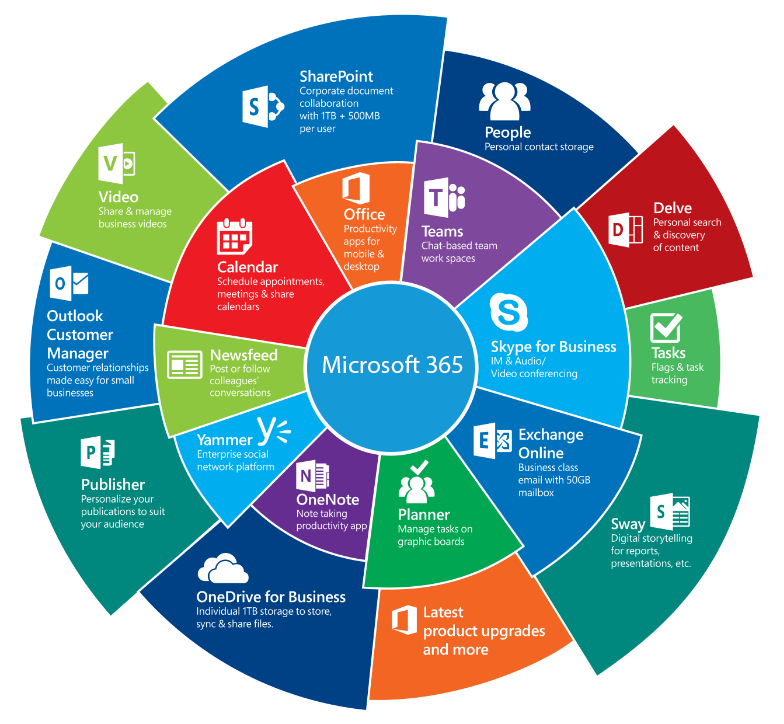
How Microsoft 365 fits
Microsoft 365 and SharePoint Online are usually the workplace layer — where people open the day-to-day work. Where OpenText and SAP already hold the record, they stay the record. This page is about that adjacency: an intranet people can find, permissions that hold after go-live, and content you can trust before anyone adds AI.
Common Questions
-
Usually no. Many organizations already own Microsoft 365 capabilities that cover SharePoint Online. We design against what you already license - and name anything that would truly require more as an option you can decline.
-
Because launch-day success is people reaching what they are entitled to see - and not seeing what they are not. We design the access model first (who can see what, from which groups), then build pages and libraries against that model. Navigation and search should never leak titles a person cannot open.
-
No. Where OpenText and SAP already hold the record, they stay the record. Microsoft 365 and SharePoint are where people often open the day-to-day work. We design that adjacency - not a second place of record and not a rip-and-replace.
-
Enough to be specific, not elaborate. Shared landing pages and key regions get clear owners, limits, and empty states so “clean” is something you can still check years later. Pictures without rules do not survive the first request to add one more widget.
-
Not by default. Useful SI starts with governed content on the estate you already run. We treat SI as optional and reversible: finish a complete, operable intranet on what you license today; add SI when ownership, permissions, and trust are ready - not as a product pitch on day one.
Common Microsoft 365 Business Challenges
Many businesses invest in Microsoft tools but don’t get the expected results. This usually happens because systems are set up without a clear plan or are not properly connected. In our experience, the problem is not the platform, but how it has been set up and used.
Different systems that don’t share data.
No clear direction on which Microsoft products to use.
Manual work is required to move information between tools.
Reports and data that are not consistent.
Microsoft 365 & SharePoint Insights
Unlock the power of data with AI to generate business insights and evergreen value.


Start a conversation
If you are shaping a Microsoft 365 or SharePoint Online intranet (or tightening what you already run) we would welcome a short conversation about where you are and what “done” should look like.